728x90

ApiApplication

package com.bx.api;

import org.springframework.boot.SpringApplication;
import org.springframework.boot.autoconfigure.SpringBootApplication;
import org.springframework.boot.autoconfigure.jdbc.DataSourceAutoConfiguration;

@SpringBootApplication(exclude = {DataSourceAutoConfiguration.class})
public class ApiApplication {

	public static void main(String[] args) {
		SpringApplication.run(ApiApplication.class, args);
	}
}

application.properties

# RabbitMQ (RK3588 IP)
spring.rabbitmq.host=192.168.0.24
spring.rabbitmq.port=5672
spring.rabbitmq.username=admin
spring.rabbitmq.password=password

Topic의 핵심: 와일드카드(Wildcards)

Topic 방식의 가장 큰 특징은 **점(.)**으로 구분된 라우팅 키와 두 가지 특수 기호를 사용할 수 있다는 점입니다.

  • * (별표): 정확히 단어 하나를 대체합니다. (예: *.orange.*)
  • # (우물 정): 0개 이상의 단어를 대체합니다. (예: lazy.#)

RabbitTopicConfig

Spring Boot에서 Topic 방식을 쓰려면 TopicExchange와 Binding을 설정

package com.bx.api.config;

import org.springframework.amqp.core.Binding;
import org.springframework.amqp.core.BindingBuilder;
import org.springframework.amqp.core.Queue;
import org.springframework.amqp.core.TopicExchange;
import org.springframework.amqp.support.converter.Jackson2JsonMessageConverter;
import org.springframework.amqp.support.converter.MessageConverter;
import org.springframework.context.annotation.Bean;
import org.springframework.context.annotation.Configuration;

@Configuration
public class RabbitTopicConfig {

	// 1. Topic 타입의 Exchange 생성
	@Bean
	public TopicExchange topicExchange() {
		return new TopicExchange("log.exchange");
	}

	// 2. 큐 생성
	@Bean
	public Queue errorQueue() {
		return new Queue("error.queue");
	}

	// 3. 바인딩 (에러 로그만 이 큐로 오게 설정)
	@Bean
	public Binding bindingError(Queue errorQueue, TopicExchange topicExchange) {
		// "#.error" 패턴을 가진 메시지만 errorQueue로 연결
		return BindingBuilder.bind(errorQueue).to(topicExchange).with("#.error");
	}

	@Bean
	public MessageConverter jsonMessageConverter() {
		// 이 설정이 있어야 객체 <-> JSON 변환이 가능합니다.
		return new Jackson2JsonMessageConverter();
	}
}

TopicConfig

Topic 방식은 Exchange, Queue, Binding 정의

package com.bx.api.config;

import org.springframework.amqp.core.*;
import org.springframework.context.annotation.Bean;
import org.springframework.context.annotation.Configuration;

@Configuration
public class TopicConfig {

	public static final String EXCHANGE_NAME = "log.topic.exchange";
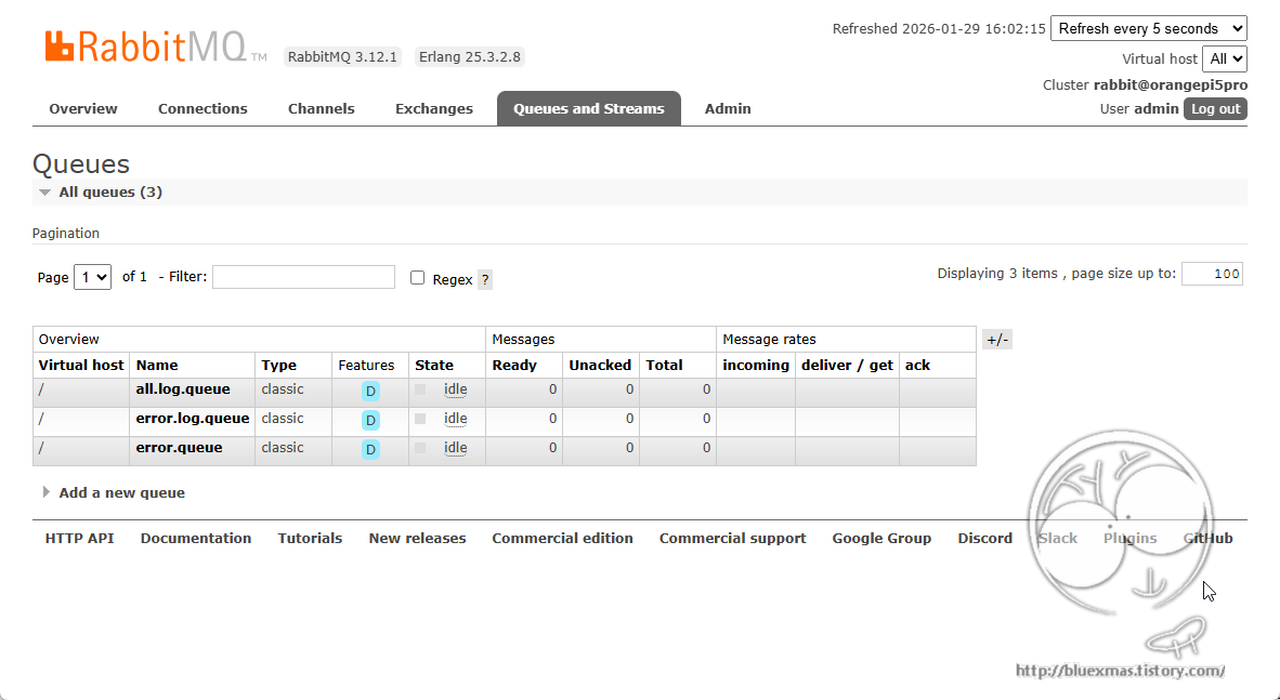
	public static final String ALL_LOG_QUEUE = "all.log.queue";
	public static final String ERROR_LOG_QUEUE = "error.log.queue";

	// 1. Topic Exchange 선언
	@Bean
	public TopicExchange logExchange() {
		return new TopicExchange(EXCHANGE_NAME);
	}

	// 2. 큐 선언 (모든 로그용 / 에러 전용)
	@Bean
	public Queue allLogQueue() {
		return new Queue(ALL_LOG_QUEUE);
	}

	@Bean
	public Queue errorLogQueue() {
		return new Queue(ERROR_LOG_QUEUE);
	}

	// 3. 바인딩 (와일드카드 사용)
	@Bean
	public Binding bindAll(Queue allLogQueue, TopicExchange logExchange) {
		// "seoul.#" -> 서울에서 발생하는 모든 로그(info, warn, error 등) 수집
		return BindingBuilder.bind(allLogQueue).to(logExchange).with("seoul.#");
	}

	@Bean
	public Binding bindError(Queue errorLogQueue, TopicExchange logExchange) {
		// "#.error" -> 지역 상관없이 모든 에러 로그만 수집
		return BindingBuilder.bind(errorLogQueue).to(logExchange).with("#.error");
	}
}

메시지 보내기 (Producer) : LogProducer

package com.bx.api.service;

import java.util.HashMap;
import java.util.Map;

import org.springframework.amqp.rabbit.core.RabbitTemplate;
import org.springframework.stereotype.Service;

import com.bx.api.config.TopicConfig;

import lombok.RequiredArgsConstructor;

@Service
@RequiredArgsConstructor
public class LogProducer {

	private final RabbitTemplate rabbitTemplate;

	public void sendLog(String location, String level, String message) {
		// 라우팅 키 생성 예: "seoul.info" 또는 "busan.error"
		String routingKey = location + "." + level;

		Map<String, String> logData = new HashMap<>();
		logData.put("location", location);
		logData.put("level", level);
		logData.put("message", message);

		rabbitTemplate.convertAndSend(TopicConfig.EXCHANGE_NAME, routingKey, logData);
		System.out.println("Sent Log with Key [" + routingKey + "]: " + message);
	}
}

메시지 받기 (Consumer) : LogConsumer

package com.bx.api.service;

import java.util.Map;

import org.springframework.amqp.rabbit.annotation.RabbitListener;
import org.springframework.stereotype.Service;

import com.bx.api.config.TopicConfig;

@Service
public class LogConsumer {

	// 서울 지역의 모든 로그 처리
	@RabbitListener(queues = TopicConfig.ALL_LOG_QUEUE)
	public void consumeAllSeoulLog(Map<String, String> message) {
		System.out.println("[서울 통합 관제센터] 수신: " + message);
	}

	// 전 지역의 에러 로그만 처리
	@RabbitListener(queues = TopicConfig.ERROR_LOG_QUEUE)
	public void consumeErrorLog(Map<String, String> message) {
		System.out.println("[긴급 에러 알람] 수신: " + message);
	}
}

로그 메시지 전송용 Controller 구현

package com.bx.api.controller;

import java.util.HashMap;
import java.util.Map;

import org.springframework.web.bind.annotation.GetMapping;
import org.springframework.web.bind.annotation.RequestParam;
import org.springframework.web.bind.annotation.RestController;

import com.bx.api.service.LogProducer;

import lombok.RequiredArgsConstructor;

@RestController
@RequiredArgsConstructor
public class RabbitController {

	private final LogProducer logProducer;

	/**
	 * HTTP GET 호출을 받아 RabbitMQ로 메시지 전송 실행 주소:
	 * http://localhost:8080/send?loc=seoul&lvl=info&msg=test_message
	 */
	@GetMapping("/send")
	public Map<String, Object> sendMessage(@RequestParam(value = "loc") String location,
			@RequestParam(value = "lvl") String level, @RequestParam(value = "msg") String message) {

		// 이전에 만든 Producer의 메서드 호출
		logProducer.sendLog(location, level, message);

		Map<String, Object> result = new HashMap<>();
		result.put("status", "success");
		result.put("routingKey", location + "." + level);
		result.put("payload", message);

		return result;
	}
}

실행
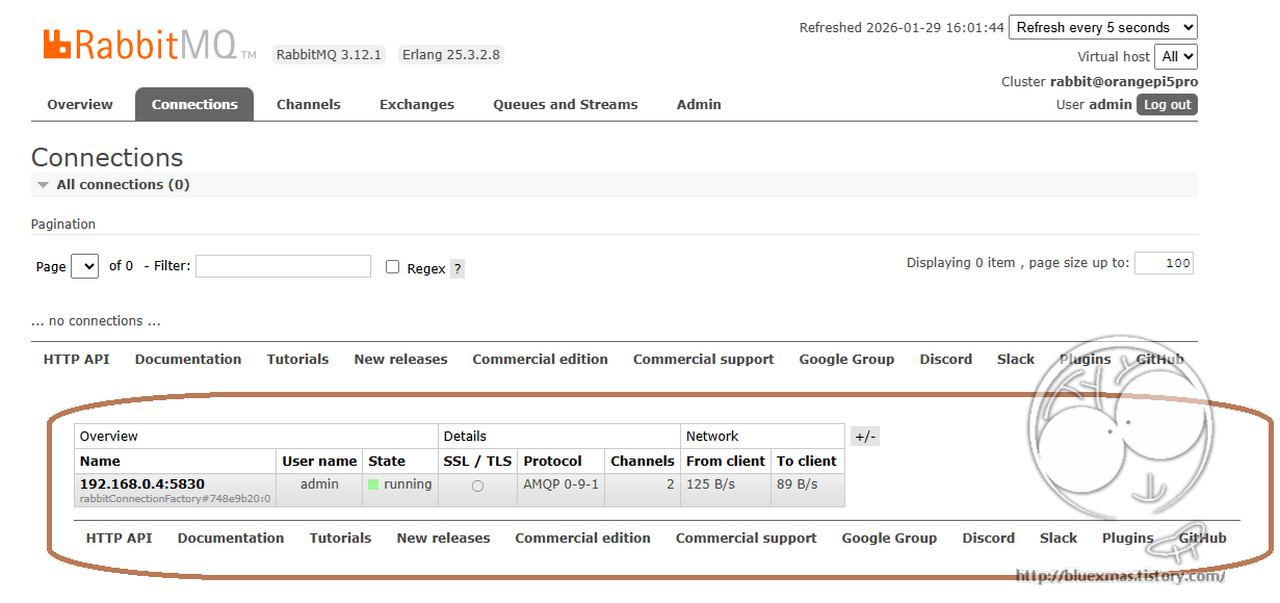
메시지 전송

호출 주소 예제

http://192.168.0.4:8080/send?loc=seoul&lvl=info&msg=test_message

서버 로그

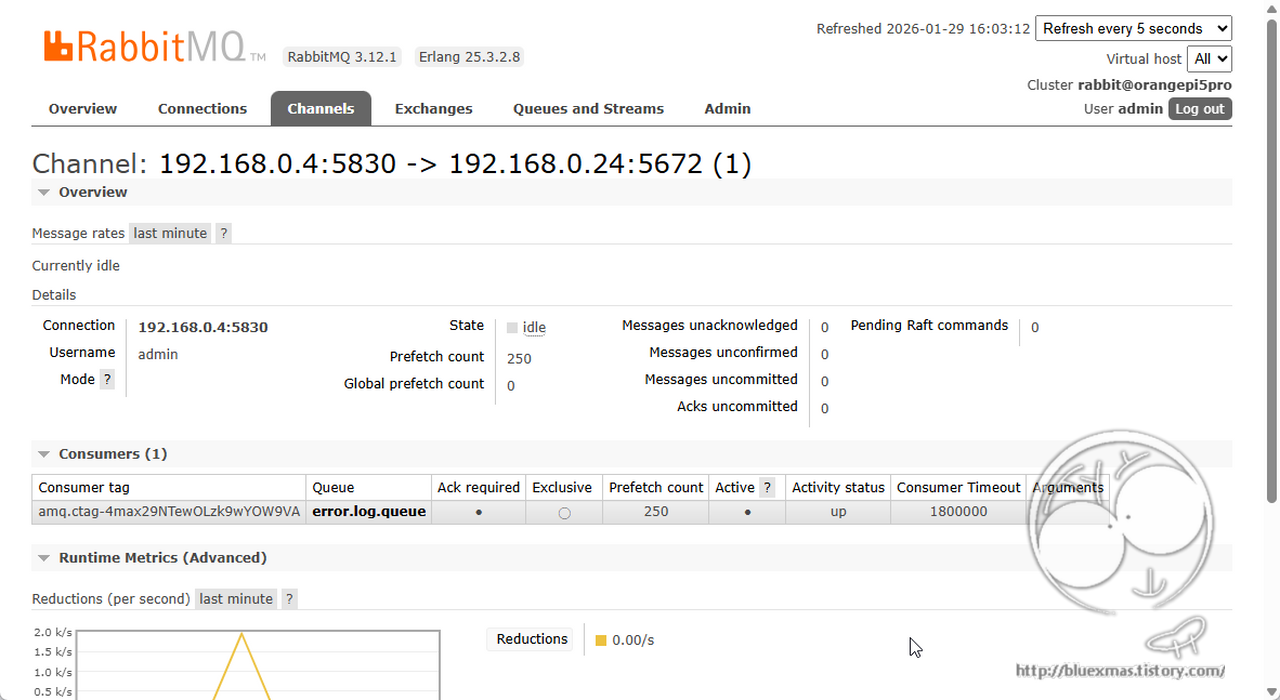
Sent Log with Key [seoul.info]: test_message
[서울 통합 관제센터] 수신: {level=info, location=seoul, message=test_message}
728x90
728x90

출처

application.properties

#File upload settings
# support multipart uploads (default: true)
spring.servlet.multipart.enabled=true
# Threshold at which files are written to memory (default: 0B)
#spring.servlet.multipart.file-size-threshold=0B 
# Temporary storage space for uploaded files
spring.servlet.multipart.location=d:/usr/local/cnssm/resources
# Maximum size of the file (default: 1MB)
spring.servlet.multipart.max-file-size=10144MB
# Maximum size of request (default: 10MB)
spring.servlet.multipart.max-request-size=10144MB

FileStorageProperties.java

package com.bx.config.property;

import org.springframework.boot.context.properties.ConfigurationProperties;
import org.springframework.context.annotation.Configuration;

@Configuration
@ConfigurationProperties(prefix = "spring.servlet.multipart")
public class FileStorageProperties {

	private String location;

	public String getLocation() {
		return location;
	}

	public void setLocation(String location) {
		this.location = location;
	}
}

FileUploadController.java

package com.bx.controller;

import java.io.File;
import java.io.FileInputStream;
import java.io.IOException;
import java.util.Arrays;
import java.util.stream.Collectors;

import org.apache.poi.ss.usermodel.Cell;
import org.apache.poi.ss.usermodel.Row;
import org.apache.poi.ss.usermodel.Sheet;
import org.apache.poi.ss.usermodel.Workbook;
import org.apache.poi.xssf.usermodel.XSSFWorkbook;
import org.springframework.beans.factory.annotation.Autowired;
import org.springframework.stereotype.Controller;
import org.springframework.ui.ModelMap;
import org.springframework.web.bind.annotation.RequestMapping;
import org.springframework.web.bind.annotation.RequestMethod;
import org.springframework.web.bind.annotation.RequestParam;
import org.springframework.web.multipart.MultipartFile;

import com.bx.common.util.ExcelUtil;
import com.bx.config.property.FileStorageProperties;
import com.bx.service.FileStorageService;

@Controller
public class FileUploadController {

	@Autowired
	private FileStorageService fileStorageService;

	@Autowired
	private FileStorageProperties fileStorageProperties;

	@RequestMapping(value = "/bx/uploadFile", method = RequestMethod.POST)
	public String uploadFile(@RequestParam("file") MultipartFile file, ModelMap modelMap) {
		String fileName = fileStorageService.storeFile(file);
		modelMap.put("fileName", fileName);
		
		try {
			if (fileName != null && (fileName.endsWith(".xls") || fileName.endsWith(".xlsx"))) {
				FileInputStream fis = new FileInputStream(new File(fileStorageProperties.getLocation() + "/" + fileName));
				Workbook workbook = new XSSFWorkbook(fis);
				
				Sheet sheet = workbook.getSheetAt(0); // 첫 번째 시트 가져오기
				
				// 행 반복 (첫 번째 행부터 마지막 행까지)
				for (Row row : sheet) {
					// 열 반복 (첫 번째 열부터 마지막 열까지)
					for (Cell cell : row) {
						// 셀 값 출력
						System.out.print(ExcelUtil.getCellValue(cell) + "\t");
					}
					System.out.println(); // 행 끝나면 줄바꿈
				}
			}
		} catch (IOException e) {
			e.printStackTrace();
		}

		return "bx/uploadOk";
	}

	@RequestMapping(value = "/uploadMultipleFiles", method = RequestMethod.POST)
	public String uploadMultipleFiles(@RequestParam("files") MultipartFile[] files, ModelMap modelMap) {
		Arrays.asList(files).stream().map(file -> uploadFile(file, modelMap)).collect(Collectors.toList());

		return "bx/uploadOk";
	}

}

FileStorageService.java

package com.bx.service;

import java.io.IOException;
import java.net.MalformedURLException;
import java.nio.file.Files;
import java.nio.file.Path;
import java.nio.file.Paths;
import java.nio.file.StandardCopyOption;

import org.springframework.beans.factory.annotation.Autowired;
import org.springframework.core.io.Resource;
import org.springframework.core.io.UrlResource;
import org.springframework.stereotype.Service;
import org.springframework.util.StringUtils;
import org.springframework.web.multipart.MultipartFile;

import com.bx.common.exception.FileNotFoundException;
import com.bx.common.exception.FileStorageException;
import com.bx.config.property.FileStorageProperties;

@Service
public class FileStorageService {

	private final Path fileStorageLocation;

	@Autowired
	public FileStorageService(FileStorageProperties fileStorageProperties) {
		this.fileStorageLocation = Paths.get(fileStorageProperties.getLocation()).toAbsolutePath().normalize();

		try {
			Files.createDirectories(this.fileStorageLocation);
		} catch (Exception ex) {
			throw new FileStorageException("Could not create the directory where the uploaded files will be stored.", ex);
		}
	}

	public String storeFile(MultipartFile file) {
		// Normalize file name
		String fileName = StringUtils.cleanPath(file.getOriginalFilename());

		try {
			// Check if the file's name contains invalid characters
			if (fileName.contains("..")) {
				throw new FileStorageException("Sorry! Filename contains invalid path sequence " + fileName);
			}

			// Copy file to the target location (Replacing existing file with the same name)
			Path targetLocation = this.fileStorageLocation.resolve(fileName);
			Files.copy(file.getInputStream(), targetLocation, StandardCopyOption.REPLACE_EXISTING);

			return fileName;
		} catch (IOException ex) {
			throw new FileStorageException("Could not store file " + fileName + ". Please try again!", ex);
		}
	}

	public Resource loadFileAsResource(String fileName) {
		try {
			Path filePath = this.fileStorageLocation.resolve(fileName).normalize();
			Resource resource = new UrlResource(filePath.toUri());
			if (resource.exists()) {
				return resource;
			} else {
				throw new FileNotFoundException("File not found " + fileName);
			}
		} catch (MalformedURLException ex) {
			throw new FileNotFoundException("File not found " + fileName, ex);
		}
	}
}

FileNotFoundException.java

package com.bx.common.exception;

import org.springframework.http.HttpStatus;
import org.springframework.web.bind.annotation.ResponseStatus;

@ResponseStatus(HttpStatus.NOT_FOUND)
public class FileNotFoundException extends RuntimeException {

	private static final long serialVersionUID = 1L;
	
	public FileNotFoundException(String message) {
		super(message);
	}
	
	public FileNotFoundException(String message, Throwable cause) {
		super(message, cause);
	}
}

FileStorageException.java

package com.bx.common.exception;

public class FileStorageException extends RuntimeException {
	
	private static final long serialVersionUID = 1L;

	public FileStorageException(String message) {
		super(message);
	}
	
	public FileStorageException(String message, Throwable cause) {
		super(message, cause);
	}
}

HTML

<form method="post" action="<c:url value="/cnssm/uploadFile"/>" enctype="multipart/form-data">

  <div>
    file : <input type="file" name="file" accept="application/vnd.openxmlformats-officedocument.spreadsheetml.sheet">
  </div>
  
  <input type="submit">

</form>
728x90
728x90

출처

Maven pom.xml 설정

Maven 배포시 프로파일 선택 옵션 : mvn clean package -P prod

  <build>
    <resources>
      <resource>
        <directory>src/main/resources</directory>
        <excludes>
          <exclude>**/*.java</exclude>
        </excludes>
      </resource>
      <resource>
        <directory>src/main/resources/bluexmas-${profile}</directory>
        <excludes>
          <exclude>**/*.java</exclude>
        </excludes>
      </resource>
    </resources>
    
    <!-- 생략 -->  
  </build>
  
  <profiles>
    <profile>
      <id>dev</id>
      <activation>
        <activeByDefault>true</activeByDefault>
      </activation>
      <properties>
        <profile>dev</profile>
      </properties>
    </profile>
    <profile>
      <id>local</id>
      <properties>
        <profile>local</profile>
      </properties>
    </profile>
    <profile>
      <id>prod</id>
        <properties>
          <profile>prod</profile>
      </properties>
    </profile>
  </profiles>

src\main\resources\bluexmas-dev\config\config.properties

username=test
password=test!!

@Configuration 클래스 (PropertyConfig.java)

@Bean(name="config") : Bean 객체 config 이름으로 스프링 컨테이너에 로딩

package com.bluexmas.config;

import java.io.IOException;

import org.springframework.beans.factory.config.PropertiesFactoryBean;
import org.springframework.context.annotation.Bean;
import org.springframework.context.annotation.Configuration;
import org.springframework.core.io.Resource;
import org.springframework.core.io.support.PathMatchingResourcePatternResolver;

@Configuration
public class PropertyConfig {

	@Bean(name="config")
	public static PropertiesFactoryBean config() throws IOException {
		PropertiesFactoryBean pspc = new PropertiesFactoryBean();
		Resource[] resources = new PathMatchingResourcePatternResolver()
				.getResources("classpath:/config/config.properties");
		pspc.setLocations(resources);
		return pspc;
	}
}

Config 값 참조

@Resource(name="config") : config 이름의 Properties 객체 참조
@Value("#{config['username']}") : config 이름의 Properties 객체에서 username 값 참조

package com.bluexmas.controller;

import java.util.Properties;

import javax.annotation.Resource;

import org.springframework.beans.factory.annotation.Value;
import org.springframework.stereotype.Controller;
import org.springframework.web.bind.annotation.RequestMapping;
import org.springframework.web.bind.annotation.ResponseBody;

@Controller
public class SampleController {
	
	@Resource(name="config")
	private Properties config;
	
	@Value("#{config['username']}")
	private String username;
	
	@ResponseBody
	@RequestMapping("/sample")
	public String sample() {
		System.out.println("username.1 = " + config.get("username"));
		System.out.println("username.2 = " + username);
		
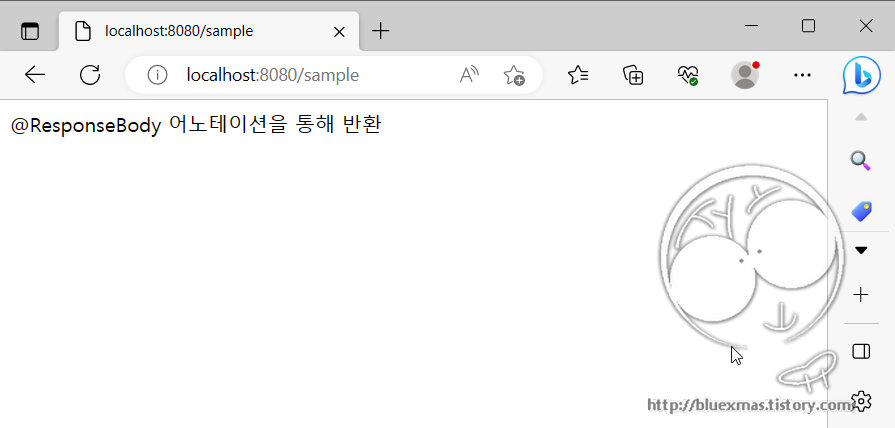
		String data = "@ResponseBody 어노테이션을 통해 반환";
		return data;
	}
	
}
728x90
728x90

출처

Maven pom.xml 설정

    <dependency>
        <groupId>org.springframework</groupId>
        <artifactId>spring-tx</artifactId>
        <version>5.2.3.RELEASE</version>
    </dependency>
    <!-- https://mvnrepository.com/artifact/org.mybatis.spring.boot/mybatis-spring-boot-starter -->
    <dependency>
      <groupId>org.mybatis.spring.boot</groupId>
      <artifactId>mybatis-spring-boot-starter</artifactId>
      <version>2.1.1</version>
    </dependency>
    
    <!-- https://mvnrepository.com/artifact/mysql/mysql-connector-java -->
    <dependency>
      <groupId>mysql</groupId>
      <artifactId>mysql-connector-java</artifactId>
      <version>5.1.6</version>
    </dependency>
    <!-- mybatis -->
    <dependency>
      <groupId>org.mybatis</groupId>
      <artifactId>mybatis</artifactId>
      <version>3.4.2</version>
    </dependency>
    <!-- mybatis spring -->
    <dependency>
      <groupId>org.mybatis</groupId>
      <artifactId>mybatis-spring</artifactId>
      <version>1.3.1</version>
    </dependency>
    <!-- https://mvnrepository.com/artifact/org.projectlombok/lombok -->
    <dependency>
      <groupId>org.projectlombok</groupId>
      <artifactId>lombok</artifactId>
      <version>1.18.4</version>
      <scope>provided</scope>
    </dependency>

application.properties

## MySQL
spring.datasource.driver-class-name=org.gjt.mm.mysql.Driver
spring.datasource.url=jdbc:mysql://localhost:3306/test_db?user=user1&useUnicode=true&characterEncoding=UTF8&zeroDateTimeBehavior=convertToNull&useSSL=false
spring.datasource.username=user1
spring.datasource.password=user1!!

# 패키지 result tpye에 명을 생략할 수 있도록 alias 설정
mybatis.type-aliases-package=com.bluexmas.domain

# model 프로퍼티 camel case 설정
# mybatis.configuration.map-underscore-to-camel-case=true

# Mybatis mapper 위치 설정
mybatis.mapper-locations=classpath:/**/**.xml

Domain

package com.bluexmas.domain;

import java.sql.Date;

import lombok.Data;

@Data
public class Notice {
	
	// pk
	private int notice_no;
	
	private String notice_type;
	private String title;
	private String content;
	private int hit;
	private int reg_no;
	private Date reg_dt;
	private Date upt_dt;
	private String del_yn;
	private Date del_dt;
	
}

Persistence

package com.bluexmas.persistence;

import java.util.List;
import java.util.Map;

import org.apache.ibatis.annotations.Mapper;

import com.bluexmas.domain.Notice;

@Mapper
public interface NoticeMapper {

	public Notice selectNotice(Map<String, Object> params);

	public int insertNotice(Notice notice);

	public int updateNotice(Notice notice);

	public int deleteNotice(Map<String, Object> params);

	public int getCount();

	public List listNotice(Map<String, Object> map);

}

Service

package com.bluexmas.service;

import java.util.HashMap;
import java.util.List;
import java.util.Map;

import org.springframework.beans.factory.annotation.Autowired;
import org.springframework.stereotype.Service;

import com.bluexmas.domain.Notice;
import com.bluexmas.persistence.NoticeMapper;

@Service
public class NoticeService {

	@Autowired
	private NoticeMapper noticeMapper;

	public Notice selectNotice(int noticeNo) {
		Map<String, Object> params = new HashMap<String, Object>();
		params.put("notice_no",noticeNo);
		return noticeMapper.selectNotice(params);
	}

	public int insertNotice(Notice notice) {
		return noticeMapper.insertNotice(notice);
	}

	public int updateNotice(Notice notice) {
		return noticeMapper.updateNotice(notice);
	}

	public int deleteNotice(int noticeNo) {
		Map<String, Object> params = new HashMap<String, Object>();
		params.put("notice_no",noticeNo);
		return noticeMapper.deleteNotice(params);
	}

	public int getCount() {
		return noticeMapper.getCount();
	}

	public List listNotice() throws Exception {
		Map<String, Object> params = new HashMap<String, Object>();
		return noticeMapper.listNotice(params);
	}
}

src\main\mybatis\com\bluexmas\persistence\NoticeMapper.xml

<?xml version="1.0" encoding="UTF-8"?>
<!DOCTYPE mapper PUBLIC "-//mybatis.org//DTD Mapper 3.0//EN"
"http://mybatis.org/dtd/mybatis-3-mapper.dtd">

<mapper namespace="com.bluexmas.persistence.NoticeMapper">

	<!-- selectNotice -->
	<select id="selectNotice" parameterType="map" resultType="com.bluexmas.domain.Notice">
		select *
		  from notice
		 where notice_no = #{notice_no}
	</select>

	<!-- insertNotice -->
	<insert id="insertNotice" parameterType="com.bluexmas.domain.Notice" statementType="PREPARED">
		insert into notice(
		    <trim suffixOverrides=",">
		      <if test="notice_type != null">notice_type ,</if>
		      <if test="title != null">title ,</if>
		      <if test="content != null">content ,</if>
		      <if test="hit != null">hit ,</if>
		      <if test="reg_no != null">reg_no ,</if>
		      <if test="reg_dt != null">reg_dt ,</if>
		      <if test="upt_dt != null">upt_dt ,</if>
		      <if test="del_yn != null">del_yn ,</if>
		      <if test="del_dt != null">del_dt ,</if>
		    </trim>
		    ) values (
		    <trim suffixOverrides=",">
		      <if test="notice_type != null">#{notice_type, jdbcType=VARCHAR} ,</if>
		      <if test="title != null">#{title, jdbcType=VARCHAR} ,</if>
		      <if test="content != null">#{content, jdbcType=VARCHAR} ,</if>
		      <if test="hit != null">#{hit, jdbcType=INTEGER} ,</if>
		      <if test="reg_no != null">#{reg_no, jdbcType=INTEGER} ,</if>
		      <if test="reg_dt != null">#{reg_dt, jdbcType=TIMESTAMP} ,</if>
		      <if test="upt_dt != null">#{upt_dt, jdbcType=TIMESTAMP} ,</if>
		      <if test="del_yn != null">#{del_yn, jdbcType=VARCHAR} ,</if>
		      <if test="del_dt != null">#{del_dt, jdbcType=TIMESTAMP} ,</if>
		    </trim>
		)
		<selectKey keyProperty="notice_no" resultType="Integer">
			SELECT LAST_INSERT_ID()
		</selectKey>
	</insert>

	<!-- updateNotice -->
	<update id="updateNotice" parameterType="com.bluexmas.domain.Notice" statementType="PREPARED">
		update notice
		    <trim prefix="SET" suffixOverrides=",">
		      <if test="notice_type != null">notice_type = #{notice_type, jdbcType=VARCHAR} ,</if>
		      <if test="title != null">title = #{title, jdbcType=VARCHAR} ,</if>
		      <if test="content != null">content = #{content, jdbcType=VARCHAR} ,</if>
		      <if test="hit != null">hit = #{hit, jdbcType=INTEGER} ,</if>
		      <if test="reg_no != null">reg_no = #{reg_no, jdbcType=INTEGER} ,</if>
		      <if test="reg_dt != null">reg_dt = #{reg_dt, jdbcType=TIMESTAMP} ,</if>
		      <if test="upt_dt != null">upt_dt = #{upt_dt, jdbcType=TIMESTAMP} ,</if>
		      <if test="del_yn != null">del_yn = #{del_yn, jdbcType=VARCHAR} ,</if>
		      <if test="del_dt != null">del_dt = #{del_dt, jdbcType=TIMESTAMP} ,</if>
		    </trim>
		 where notice_no = #{notice_no}
	</update>

	<!-- deleteNotice -->
	<delete id="deleteNotice" parameterType="map" statementType="PREPARED">
		delete from notice
		 where notice_no = #{notice_no}
	</delete>

	<!-- getCount -->
	<select id="getCount" resultType="int">
		select count(*)
		  from notice
	</select>

	<!-- listNotice -->
	<select id="listNotice" parameterType="map" resultType="com.bluexmas.domain.Notice">
		select a.*
		  FROM notice a
	</select>

</mapper>

Controller 소스

package com.bluexmas.controller;

import java.util.HashMap;
import java.util.List;
import java.util.Map;

import org.springframework.beans.factory.annotation.Autowired;
import org.springframework.stereotype.Controller;
import org.springframework.ui.ModelMap;
import org.springframework.web.bind.annotation.RequestMapping;
import org.springframework.web.bind.annotation.RequestMethod;
import org.springframework.web.bind.annotation.ResponseBody;

import com.bluexmas.domain.Notice;
import com.bluexmas.service.NoticeService;

@Controller
public class NoticeController {

	@Autowired
	private NoticeService noticeService;
	
	@RequestMapping(value="/notice_list.do", method=RequestMethod.GET)
	public @ResponseBody Map<String, Object> notice_list(ModelMap modelMap) throws Exception {
		//
		Map<String, Object> result = new HashMap<> ();
		
		//
		List<Notice> listNotice = noticeService.listNotice();
		result.put("notice_list", listNotice);
		
		//
		return result;
	}
}

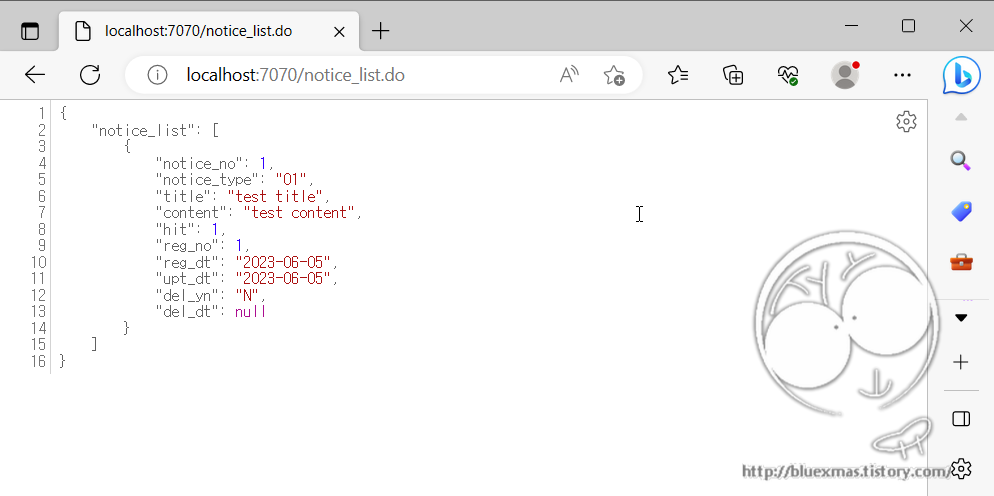
실행

728x90
728x90

출처

Maven pom.xml 설정

    <!-- https://mvnrepository.com/artifact/org.springframework.boot/spring-boot-starter-web -->
    <dependency>
      <groupId>org.springframework.boot</groupId>
      <artifactId>spring-boot-starter-web</artifactId>
      <version>2.2.4.RELEASE</version>
    </dependency>
    <!-- https://mvnrepository.com/artifact/org.springframework.boot/spring-boot-starter-tomcat -->
    <dependency>
      <groupId>org.springframework.boot</groupId>
      <artifactId>spring-boot-starter-tomcat</artifactId>
      <version>3.1.0</version>
    </dependency>
    <!-- https://mvnrepository.com/artifact/org.apache.tomcat.embed/tomcat-embed-jasper -->
    <dependency>
      <groupId>org.apache.tomcat.embed</groupId>
      <artifactId>tomcat-embed-jasper</artifactId>
      <version>9.0.31</version>
    </dependency>
    <!-- https://mvnrepository.com/artifact/javax.servlet/jstl -->
    <dependency>
      <groupId>javax.servlet</groupId>
      <artifactId>jstl</artifactId>
      <version>1.2</version>
    </dependency>

Spring Boot JSP ViewResolver 구성

JSP 파일 위치를 해결하려면 두 가지 방법을 사용할 수 있습니다.

1) application.properties에 항목 추가

#http port
server.port=7070

spring.mvc.view.prefix=/WEB-INF/jsp/
spring.mvc.view.suffix=.jsp

2) JSP 페이지를 제공하도록 InternalResourceViewResolver 구성

package com.bluexmas.config;
 
import org.springframework.context.annotation.ComponentScan;
import org.springframework.context.annotation.Configuration;
import org.springframework.web.servlet.config.annotation.EnableWebMvc;
import org.springframework.web.servlet.config.annotation.ViewResolverRegistry;

import org.springframework.web.servlet.config.annotation.WebMvcConfigurerAdapter;
import org.springframework.web.servlet.view.InternalResourceViewResolver;
import org.springframework.web.servlet.view.JstlView;
 
@Configuration
@EnableWebMvc
@ComponentScan
public class MvcConfiguration extends WebMvcConfigurerAdapter
{
  @Override
  public void configureViewResolvers(ViewResolverRegistry registry) {
    InternalResourceViewResolver resolver = new InternalResourceViewResolver();
    resolver.setPrefix("/WEB-INF/view/");
    resolver.setSuffix(".jsp");
    resolver.setViewClass(JstlView.class);
    registry.viewResolver(resolver);
  }
}

Controller 소스

package com.bluexmas.controller;

import java.util.ArrayList;
import java.util.List;

import org.springframework.stereotype.Controller;
import org.springframework.ui.ModelMap;
import org.springframework.web.bind.annotation.RequestMapping;
import org.springframework.web.bind.annotation.ResponseBody;

@Controller
public class SampleController {
	
	/*
	 * 스프링부트에서의 jsp 호출 테스트
	 */
	@RequestMapping("/jspSample")
	public String jspSample(ModelMap modelMap) throws Exception {
		modelMap.put("name", "홍길동");

		List jspSample = new ArrayList();
		jspSample.add("국어 : 100점");
		jspSample.add("수학 : 90점");
		jspSample.add("영어 : 75점");

		modelMap.put("list", jspSample);
		
		return "jspSample";
	}
}

View(JSP) - src\main\webapp\WEB-INF\jsp\jspSample.jsp

<%@ page language="java" contentType="text/html; charset=UTF-8" pageEncoding="UTF-8"%>
<%@ taglib prefix="c" uri="http://java.sun.com/jsp/jstl/core"%>
 
<html>
<head>
<meta charset="UTF-8">
    <title>JSP Sample Page</title>
</head>
    <body>
 
       <div>[${name}]님의 시험성적입니다.</div>
 
        <c:forEach var="item" items="${list}">
         ${item} <br />
        </c:forEach>
 
    </body>
</html>

실행

728x90
728x90

출처

Maven pom.xml 설정

    <!-- https://mvnrepository.com/artifact/org.springframework.boot/spring-boot-starter-web -->
    <dependency>
      <groupId>org.springframework.boot</groupId>
      <artifactId>spring-boot-starter-web</artifactId>
      <version>2.2.4.RELEASE</version>
    </dependency>
    <!-- https://mvnrepository.com/artifact/org.springframework.boot/spring-boot-starter-tomcat -->
    <dependency>
      <groupId>org.springframework.boot</groupId>
      <artifactId>spring-boot-starter-tomcat</artifactId>
      <version>3.1.0</version>
    </dependency>
    <!-- https://mvnrepository.com/artifact/org.apache.tomcat.embed/tomcat-embed-jasper -->
    <dependency>
      <groupId>org.apache.tomcat.embed</groupId>
      <artifactId>tomcat-embed-jasper</artifactId>
      <version>9.0.31</version>
    </dependency>
    <!-- https://mvnrepository.com/artifact/javax.servlet/jstl -->
    <dependency>
      <groupId>javax.servlet</groupId>
      <artifactId>jstl</artifactId>
      <version>1.2</version>
    </dependency>

Spring Boot main 소스

Spring Boot main 소스 하위 패키지만 자동으로 로딩(Controller, Service)

package com.bluexmas;

import org.springframework.boot.SpringApplication;
import org.springframework.boot.autoconfigure.SpringBootApplication;
import org.springframework.boot.web.servlet.support.SpringBootServletInitializer;

@SpringBootApplication
//@ComponentScan(basePackages = {"com.bluexmas.controller"})
public class BluexmasApplication extends SpringBootServletInitializer {

    public static void main(String[] args) {
        SpringApplication.run(BluexmasApplication.class, args);
    }
    
}

Controller 소스

package com.bluexmas.controller;

import org.springframework.stereotype.Controller;
import org.springframework.web.bind.annotation.RequestMapping;
import org.springframework.web.bind.annotation.ResponseBody;

@Controller
public class SampleController {
	
	@ResponseBody
	@RequestMapping("/sample")
	public String sample() {
		String data = "@ResponseBody 어노테이션을 통해 반환";
		return data;
	}

}

실행

728x90
728x90

출처

pom.xml

  <dependencies>
    <!-- https://mvnrepository.com/artifact/org.springframework.boot/spring-boot-starter-web -->
    <dependency>
      <groupId>org.springframework.boot</groupId>
      <artifactId>spring-boot-starter-web</artifactId>
      <version>2.2.4.RELEASE</version>
    </dependency>
  </dependencies>

SpringBootApplication

package com.bluexmas.example;

import org.springframework.boot.SpringApplication;
import org.springframework.boot.autoconfigure.SpringBootApplication;
import org.springframework.boot.builder.SpringApplicationBuilder;
import org.springframework.boot.web.servlet.support.SpringBootServletInitializer;

@SpringBootApplication
public class BluexmasApplication extends SpringBootServletInitializer {

    public static void main(String[] args) {
        SpringApplication.run(BluexmasApplication.class, args);
    }
    
    @Override
    protected SpringApplicationBuilder configure(SpringApplicationBuilder builder) {
        //return super.configure(builder);
        return builder.sources(BluexmasApplication.class);
    }
}

resources\config\application-dev.properties

#http port
server.port=7070

Spring Profile 설정

-Dspring.profiles.active=dev

실행로그

  .   ____          _            __ _ _
 /\\ / ___'_ __ _ _(_)_ __  __ _ \ \ \ \
( ( )\___ | '_ | '_| | '_ \/ _` | \ \ \ \
 \\/  ___)| |_)| | | | | || (_| |  ) ) ) )
  '  |____| .__|_| |_|_| |_\__, | / / / /
 =========|_|==============|___/=/_/_/_/
 :: Spring Boot ::        (v2.2.4.RELEASE)

2023-06-04 15:34:47.637  INFO 13456 --- [           main] c.bluexmas.example.BluexmasApplication   : Starting BluexmasApplication on DESKTOP-F8HR1P3 with PID 13456 (D:\project2\phEMS\workspace.ems\spring-boot-example1\target\classes started by bluesanta in D:\project2\phEMS\workspace.ems\spring-boot-example1)
2023-06-04 15:34:47.640  INFO 13456 --- [           main] c.bluexmas.example.BluexmasApplication   : The following profiles are active: dev
2023-06-04 15:34:49.054  INFO 13456 --- [           main] o.s.b.w.embedded.tomcat.TomcatWebServer  : Tomcat initialized with port(s): 7070 (http)
2023-06-04 15:34:49.064  INFO 13456 --- [           main] o.apache.catalina.core.StandardService   : 서비스 [Tomcat]을(를) 시작합니다.
2023-06-04 15:34:49.064  INFO 13456 --- [           main] org.apache.catalina.core.StandardEngine  : 서버 엔진을 시작합니다: [Apache Tomcat/9.0.31]
2023-06-04 15:34:49.299  INFO 13456 --- [           main] org.apache.jasper.servlet.TldScanner     : 적어도 하나의 JAR가 TLD들을 찾기 위해 스캔되었으나 아무 것도 찾지 못했습니다. 스캔했으나 TLD가 없는 JAR들의 전체 목록을 보시려면, 로그 레벨을 디버그 레벨로 설정하십시오. 스캔 과정에서 불필요한 JAR들을 건너뛰면, 시스템 시작 시간과 JSP 컴파일 시간을 단축시킬 수 있습니다.
2023-06-04 15:34:49.307  INFO 13456 --- [           main] o.a.c.c.C.[Tomcat].[localhost].[/]       : Initializing Spring embedded WebApplicationContext
2023-06-04 15:34:49.307  INFO 13456 --- [           main] o.s.web.context.ContextLoader            : Root WebApplicationContext: initialization completed in 1606 ms
2023-06-04 15:34:49.480  INFO 13456 --- [           main] o.s.s.concurrent.ThreadPoolTaskExecutor  : Initializing ExecutorService 'applicationTaskExecutor'
2023-06-04 15:34:49.644  INFO 13456 --- [           main] o.s.b.w.embedded.tomcat.TomcatWebServer  : Tomcat started on port(s): 7070 (http) with context path ''
2023-06-04 15:34:49.648  INFO 13456 --- [           main] c.bluexmas.example.BluexmasApplication   : Started BluexmasApplication in 2.423 seconds (JVM running for 2.838)
728x90
728x90

출처

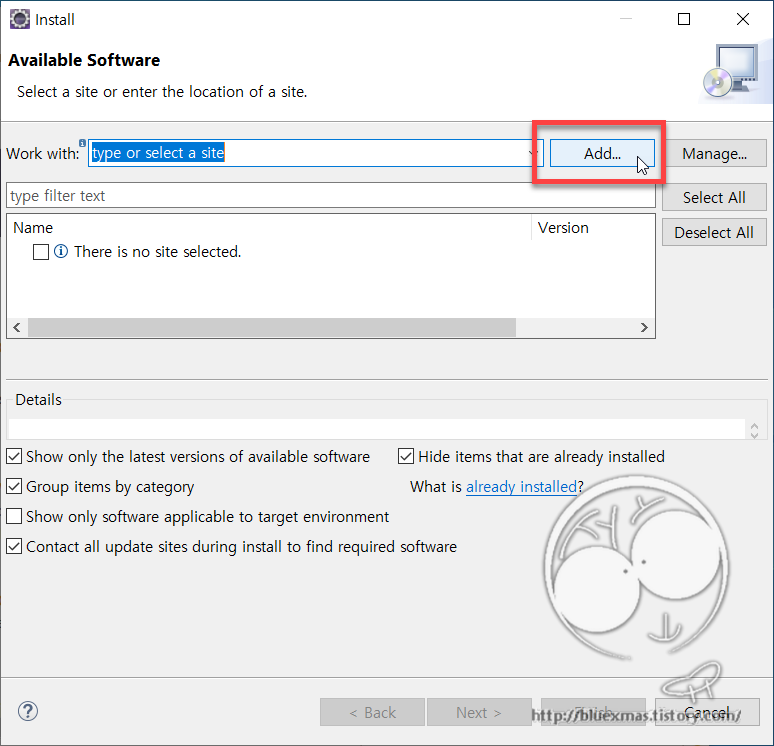
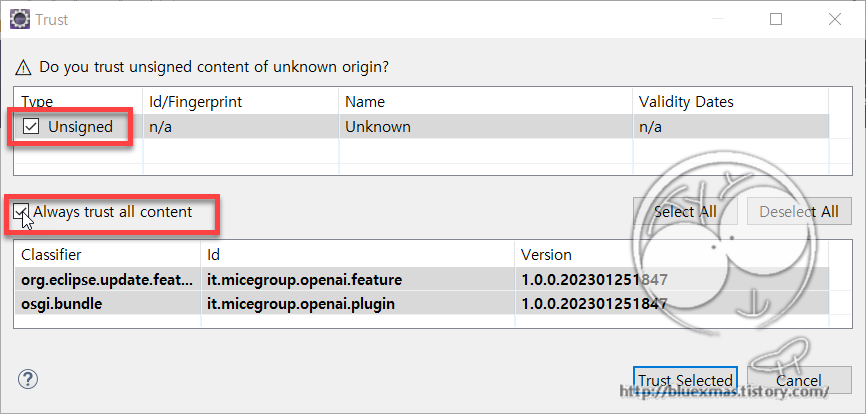
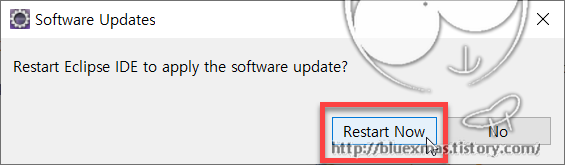
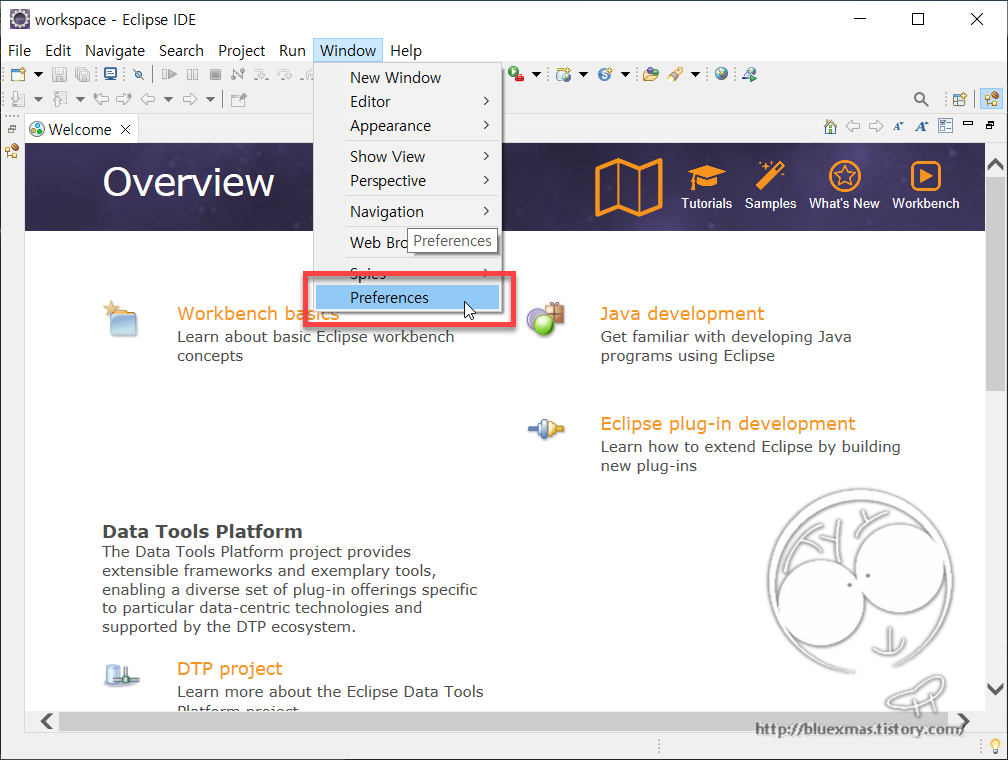
ChatGPT 플러그인 설치

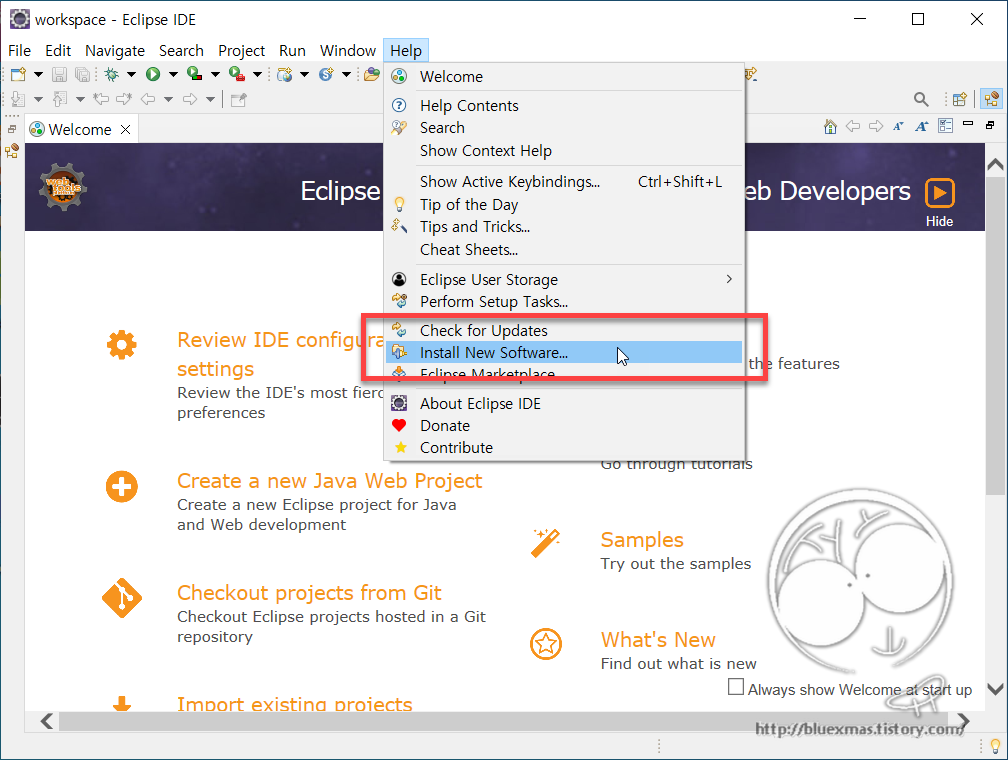
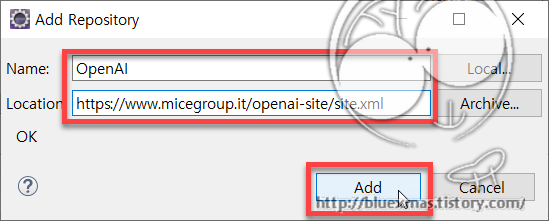
Repository 정보 입력

Name : OpenAI
Location : https://www.micegroup.it/openai-site/site.xml

OpenAI API 키 입력

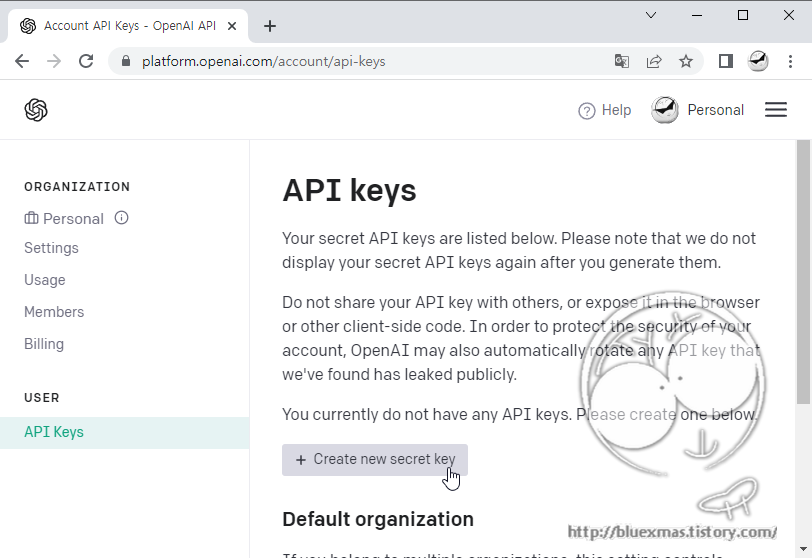
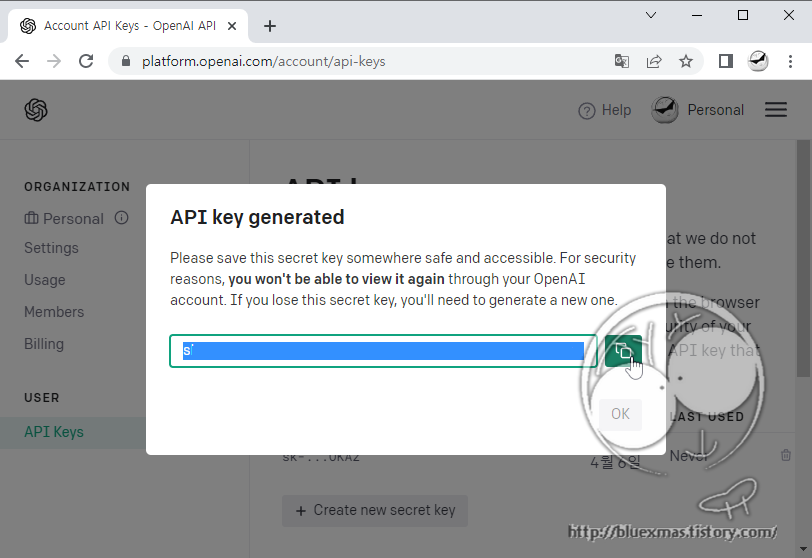
https://platform.openai.com/account/api-keys 에서 API Key 생성 하기

API Key 적용

예제 만들기

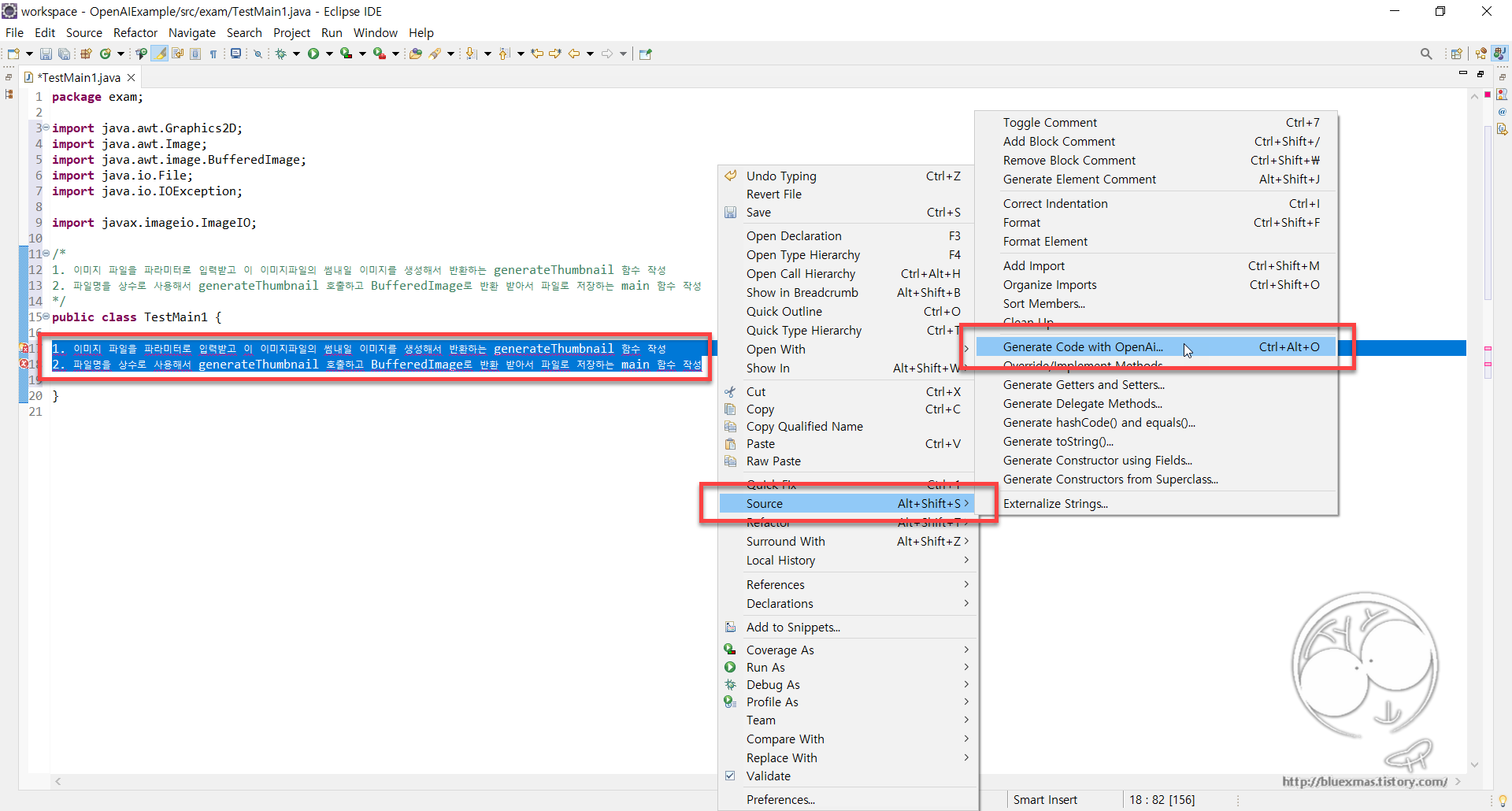
코드 생성용 질문 만들기

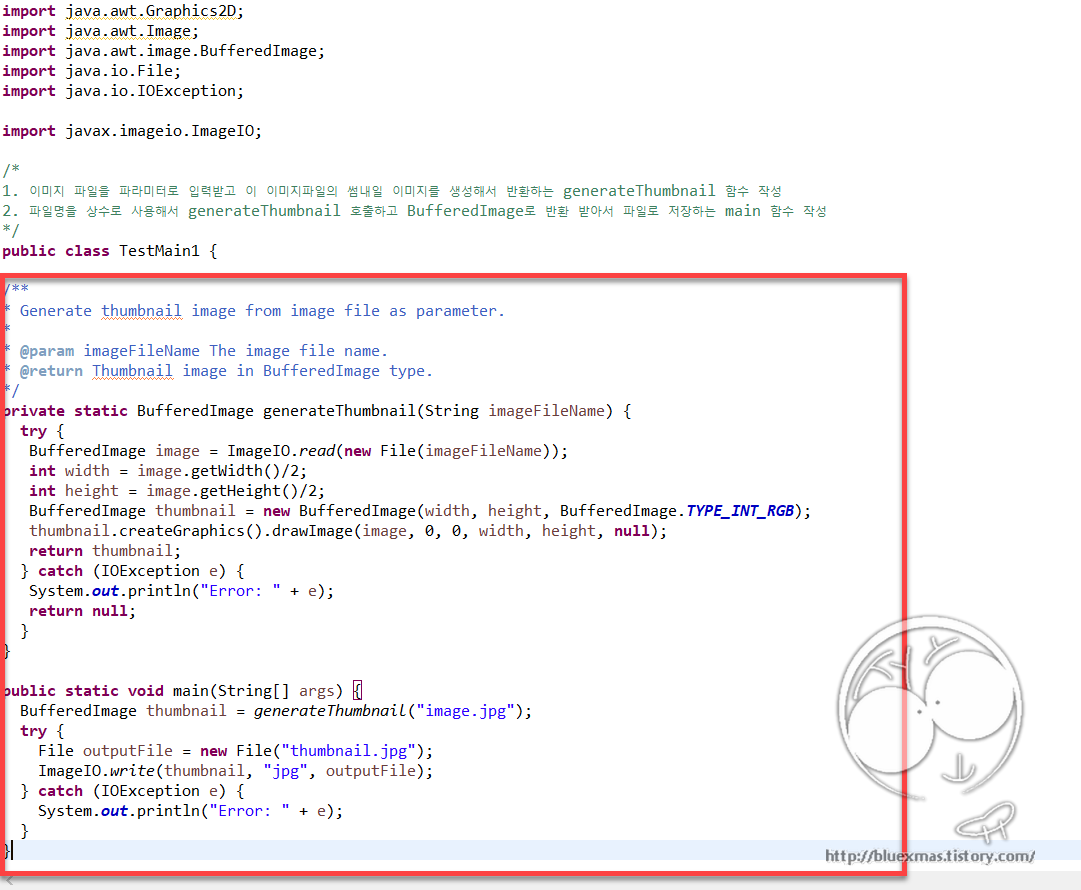
1. 이미지 파일을 파라미터로 입력받고 이 이미지파일의 썸내일 이미지를 생성해서 반환하는 generateThumbnail 함수 작성
2. 파일명을 상수로 사용해서 generateThumbnail 호출하고 BufferedImage로 반환 받아서 파일로 저장하는 main 함수 작성

ChatGPT에 Java 코드 생성 요청

자동으로 생성된 Java 코드

728x90
728x90

Spring MVC : 파일 다운로드

package com.bluexmas.ui.controller;

import java.io.BufferedInputStream;
import java.io.BufferedOutputStream;
import java.io.File;
import java.io.FileInputStream;
import java.io.IOException;
import java.io.InputStream;
import java.io.UnsupportedEncodingException;
import java.net.URLEncoder;

import javax.servlet.http.HttpServletRequest;
import javax.servlet.http.HttpServletResponse;

import org.apache.commons.compress.archivers.zip.ZipArchiveEntry;
import org.apache.commons.compress.archivers.zip.ZipArchiveOutputStream;
import org.slf4j.Logger;
import org.slf4j.LoggerFactory;
import org.springframework.stereotype.Controller;
import org.springframework.web.bind.annotation.RequestMapping;

import com.bluexmas.util.ConfigUtils;
import com.bluexmas.util.FileUtilsEx;

@Controller
public class ExcelDownloadController {

  private static final Logger logger = LoggerFactory.getLogger(CommonAcountController.class);

  private static final int COMPRESSION_LEVEL = 3;

  private static final int BUFFER_SIZE = 1024 * 2;

  @RequestMapping(value = { "/app/download.do", "/{app}/app/download.do" })
  public void download(HttpServletRequest request, HttpServletResponse response) throws IOException {
    
    // 다운로드 파일명 설정
    this.setDownloadFilename("bluexmas.png", request, response);
    
    InputStream is = null;
    BufferedInputStream fin = null;
    BufferedOutputStream outs = null;

    try {
      File sourceFile = new File(ConfigUtils.getConfigPath(), "bluexmas.png");
      is = new FileInputStream(sourceFile);
      fin = new BufferedInputStream(is);
      outs = new BufferedOutputStream(response.getOutputStream());
      int read = 0;
      
      byte[] buffer = new byte[BUFFER_SIZE];
      while ((read = fin.read(buffer)) != -1) {
        outs.write(buffer, 0, read);
      }
    } catch (Exception e) {
      e.printStackTrace();
    } finally {
      if (outs != null) outs.close();
      if (fin != null) fin.close();
      if (is != null) is.close();
    }
  }

  @RequestMapping(value = { "/app/zip_download.do", "/{app}/app/zip_download.do" })
  public void zip_download(HttpServletRequest request, HttpServletResponse response) throws Exception {
    //
    ZipArchiveOutputStream zos = null;
    
    try {
      zos = new ZipArchiveOutputStream(response.getOutputStream());
      zos.setEncoding("UTF-8");
      zos.setLevel(COMPRESSION_LEVEL); // 압축 레벨 - 최대 압축률은 9, 디폴트 8
      
      String zipName = FileUtilsEx.cleanDirName("bluexmas.zip");
      this.setDownloadFilename(zipName, request, response);
      
      File sourceFile = new File(ConfigUtils.getConfigPath(), "bluexmas.png");
      this.compress(zos, sourceFile, "santa.png");
      
      zos.finish();
      int file_size = (int) zos.getBytesWritten();
    } catch (Exception e) {
      logger.error(e.getMessage(), e);
    }
  }

  // 압축파일에 파일 주가
  private void compress(ZipArchiveOutputStream zos, File sourceFile, String zipName) throws IOException {
    BufferedInputStream bis = null;

    try {
      bis = new BufferedInputStream(new FileInputStream(sourceFile));
      ZipArchiveEntry zentry = new ZipArchiveEntry(zipName);
      
      if (sourceFile != null)
        zentry.setTime(sourceFile.lastModified());
      
      zos.putArchiveEntry(zentry);

      byte[] buffer = new byte[BUFFER_SIZE];
      int cnt = 0;
      while ((cnt = bis.read(buffer, 0, BUFFER_SIZE)) != -1) {
        zos.write(buffer, 0, cnt);
      }
      zos.closeArchiveEntry();

    } catch (Exception e) {
      logger.error(e.getMessage(), e);
    } finally {
      if (bis != null) {
        bis.close();
      }
    }
  }

  // 다운로드 파일명 설정
  private void setDownloadFilename(String fileName, HttpServletRequest request, HttpServletResponse response)
      throws UnsupportedEncodingException {
    String header = getBrowser(request);
    if (header.contains("MSIE")) {
      String docName = URLEncoder.encode(fileName, "UTF-8").replaceAll("\\+", "%20");
      response.setHeader("Filename-Encoding", "urlencode");
      response.setHeader("Content-Disposition", "attachment;filename=" + docName + ";");
    } else if (header.contains("Firefox")) {
      String docName = new String(fileName.getBytes("UTF-8"), "ISO-8859-1");
      response.setHeader("Content-Disposition", "attachment; filename=\"" + docName + "\"");
    } else if (header.contains("Opera")) {
      String docName = new String(fileName.getBytes("UTF-8"), "ISO-8859-1");
      response.setHeader("Content-Disposition", "attachment; filename=\"" + docName + "\"");
    } else if (header.contains("Chrome")) {
      String docName = new String(fileName.getBytes("UTF-8"), "ISO-8859-1");
      response.setHeader("Content-Disposition", "attachment; filename=\"" + docName + "\"");
    }
    response.setHeader("Content-Type", "application/octet-stream");
    response.setHeader("Content-Transfer-Encoding", "binary;");
    response.setHeader("Pragma", "no-cache;");
    response.setHeader("Expires", "-1;");
    // response.setHeader("filesize", file_size+";");
    response.setHeader("dn_filename", URLEncoder.encode(fileName, "UTF-8").replaceAll("\\+", "%20"));
  }

  // 브라우져 확인
  private String getBrowser(HttpServletRequest request) {
    String header = request.getHeader("User-Agent");
    if (header.contains("MSIE") || header.contains("Trident") || header.contains("Dalvik")) {
      return "MSIE";
    } else if (header.contains("Chrome")) {
      return "Chrome";
    } else if (header.contains("Opera")) {
      return "Opera";
    }
    return "Firefox";
  }

}
728x90
728x90

출처

토큰관리용 테이블생성

CREATE TABLE persistent_logins (
  series VARCHAR(64) NOT NULL,
  username VARCHAR(64) NOT NULL,
  token VARCHAR(64) NOT NULL,
  last_used DATETIME NOT NULL DEFAULT CURRENT_TIMESTAMP ON UPDATE CURRENT_TIMESTAMP,
  PRIMARY KEY USING BTREE (series)
);

Domain 객체

package com.bx.domain;

import java.util.Date;

public class PersistentLogins {

	// pk
	private String series;
	
	private String username;
	private String token;
	private Date last_used;
	
	public PersistentLogins() {
		
	}

	public PersistentLogins(String username, String series, String token, Date last_used) {
		this.username = username;
		this.series = series;
		this.token = token;
		this.last_used = last_used;
	}

	public void setSeries(String series) {
		this.series = series;
	}

	public String getSeries() {
		return this.series;
	}

	public void setUsername(String username) {
		this.username = username;
	}

	public String getUsername() {
		return this.username;
	}

	public void setToken(String token) {
		this.token = token;
	}

	public String getToken() {
		return this.token;
	}

	public void setLast_used(Date last_used) {
		this.last_used = last_used;
	}

	public Date getLast_used() {
		return this.last_used;
	}

}

Mapper 인터페이스

package com.bx.persistence;

import com.bx.domain.PersistentLogins;

public interface PersistentLoginsMapper {

	public PersistentLogins selectUserToken(String cookieSeries);

	public int insertUserToken(PersistentLogins persistentLogins);

	public int updateUserToken(PersistentLogins persistentLogins);

	public int deleteOneToken(String cookieValue);

}

Mapper xml

<?xml version="1.0" encoding="UTF-8"?>
<!DOCTYPE mapper PUBLIC "-//mybatis.org//DTD Mapper 3.0//EN"
"http://mybatis.org/dtd/mybatis-3-mapper.dtd">

<mapper namespace="com.bx.persistence.PersistentLoginsMapper">

	<!-- selectUserToken -->
	<select id="selectUserToken" parameterType="java.lang.String" resultType="com.bx.domain.PersistentLogins">
		select *
		  from persistent_logins
		 where series = #{series}
	</select>

	<!-- updateUserToken -->
	<update id="updateUserToken" parameterType="com.bx.domain.PersistentLogins" statementType="PREPARED">
		update persistent_logins
		    <trim prefix="SET" suffixOverrides=",">
		      <if test="username != null">username = #{username, jdbcType=VARCHAR} ,</if>
		      <if test="token != null">token = #{token, jdbcType=VARCHAR} ,</if>
		      <if test="last_used != null">last_used = #{last_used, jdbcType=TIMESTAMP} ,</if>
		    </trim>
		 where series = #{series}
	</update>

	<!-- insertUserToken -->
	<insert id="insertUserToken" parameterType="com.bx.domain.PersistentLogins" statementType="PREPARED">
		insert into persistent_logins(
		    <trim suffixOverrides=",">
		      <if test="series != null">series ,</if>
		      <if test="username != null">username ,</if>
		      <if test="token != null">token ,</if>
		      <if test="last_used != null">last_used ,</if>
		    </trim>
		    ) values (
		    <trim suffixOverrides=",">
		      <if test="series != null">#{series, jdbcType=VARCHAR} ,</if>
		      <if test="username != null">#{username, jdbcType=VARCHAR} ,</if>
		      <if test="token != null">#{token, jdbcType=VARCHAR} ,</if>
		      <if test="last_used != null">#{last_used, jdbcType=TIMESTAMP} ,</if>
		    </trim>
		)
	</insert>

	<!-- deleteOneToken -->
	<delete id="deleteOneToken" parameterType="java.lang.String" statementType="PREPARED">
		delete from persistent_logins
		 where series = #{cookieValue}
	</delete>

</mapper>

AbstractRememberMeServices 구현

로그인시 토큰값 DB에 저장하고, 로그아웃시 토튼값 삭제 처리

package com.oxbridge.handler;

import java.security.SecureRandom;
import java.util.Date;

import javax.servlet.http.HttpServletRequest;
import javax.servlet.http.HttpServletResponse;

import org.slf4j.Logger;
import org.slf4j.LoggerFactory;
import org.springframework.beans.factory.annotation.Autowired;
import org.springframework.dao.DataAccessException;
import org.springframework.security.core.Authentication;
import org.springframework.security.core.userdetails.UserDetails;
import org.springframework.security.core.userdetails.UserDetailsService;
import org.springframework.security.core.userdetails.UsernameNotFoundException;
import org.springframework.security.crypto.codec.Base64;
import org.springframework.security.web.authentication.rememberme.AbstractRememberMeServices;
import org.springframework.security.web.authentication.rememberme.CookieTheftException;
import org.springframework.security.web.authentication.rememberme.RememberMeAuthenticationException;

import com.bx.domain.PersistentLogins;
import com.bx.persistence.PersistentLoginsMapper;

public class UserLoginRememberMeService extends AbstractRememberMeServices {
	
	private static final Logger logger = LoggerFactory.getLogger(UserLoginRememberMeService.class);
	
	/* token값 신규 생성을 위한 랜덤 넘버 생성 객체 */
	SecureRandom random;
	
	@Autowired
	private PersistentLoginsMapper mapper;

	/* 생성자 */
	public UserLoginRememberMeService(String key, UserDetailsService userDetailsService) {
		super(key, userDetailsService);
		random = new SecureRandom();
	}

	@Override
	/* 첫 로그인 시 쿠키 발행 및 토큰정보 DB 업데이트 */
	protected void onLoginSuccess(HttpServletRequest request, HttpServletResponse response, Authentication successfulAuthentication) {
		
		// 사용자 쿠키 겁색
		String cookieValue = super.extractRememberMeCookie(request);

		// 사용자 쿠키가 존재할 경우 DB에서 해당 데이터를 삭제함
		// 2차 인증하지 않으면 자동로그인 되지 못하는 쿠키가 남아있을 수 있음
		if (cookieValue != null) {
			
			// series 값 기준으로 해당 토큰을 DB에서 삭제
			mapper.deleteOneToken(decodeCookie(cookieValue)[0]);
		}

		// 새로운 series, token 값 생성
		String username = successfulAuthentication.getName();
		String newSeriesValue = generateTokenValue();
		String newTokenValue = generateTokenValue();

		// 쿠키 발급 및 DB insert
		try {
			PersistentLogins rememberMeVO = new PersistentLogins(username, newSeriesValue, newTokenValue, new Date());

			// DB insert
			mapper.insertUserToken(rememberMeVO);

			// 쿠키 발행
			String[] rawCookieValues = new String[] { newSeriesValue, newTokenValue };
			super.setCookie(rawCookieValues, getTokenValiditySeconds(), request, response);

		} catch (DataAccessException e) {
			e.printStackTrace();
		}

		/*
		// 2차 인증을 위한 메일 발송
		String ip = request.getHeader("X-Forwarded-For");
		if (ip == null) {
			ip = request.getRemoteAddr();
		}
		String userAgent = request.getHeader("user-agent");

		boolean isSended = emailSender.sendSecondCertifyingEmail(username, newSeriesValue, newTokenValue, ip, userAgent);
		if (!isSended) {
			request.getSession().setAttribute("rememberMeMsg", "메일 전송에 실패했습니다. 등록된 메일 주소를 확인해주세요.");
		}
		*/
	}

	@Override
	/* 자동 로그인 로직 - 쿠키 유효성 검증 및 사용자 정보 객체 리턴 */
	protected UserDetails processAutoLoginCookie(String[] cookieTokens, HttpServletRequest request, HttpServletResponse response) throws RememberMeAuthenticationException, UsernameNotFoundException {
		
		// 쿠키 : series, token
		// 포함된 값이 2개가 아닌 경우
		if (cookieTokens.length != 2) {
			throw new RememberMeAuthenticationException("잘못된 쿠키");
		}

		String cookieSeries = cookieTokens[0];
		String cookieToken = cookieTokens[1];

		// DB 토큰 정보 확인
		PersistentLogins rememberMeVO = mapper.selectUserToken(cookieSeries);

		// DB에 정보가 없을 경우
		if (rememberMeVO == null) {
			throw new RememberMeAuthenticationException("존재하지 않는 series");
		}

		// DB에 series는 있는데 Token 값이 같지 않을 경우
		if (!cookieToken.equals(rememberMeVO.getToken())) {

			// DB에서 해당 데이터 삭제
			mapper.deleteOneToken(cookieSeries);
			throw new CookieTheftException("변조된 쿠키 발견");
		}
		
		/*
		// DB에 series는 있는데 certified가 null인 경우 (메일 인증되지 않은 쿠키)
		if (rememberMeVO.getCertified() == null) {
			throw new RememberMeAuthenticationException("메일 인증되지 않은 쿠키");
		}
		*/

		// 유효기간 검증
		if (rememberMeVO.getLast_used().getTime() + getTokenValiditySeconds() * 1000L < System.currentTimeMillis()) {
			// DB에서 해당 데이터 삭제
			mapper.deleteOneToken(cookieSeries);
			throw new RememberMeAuthenticationException("유효기간 만료 쿠키");
		}

		// 신규 token 값으로 업데이트
		String newToken = generateTokenValue();
		rememberMeVO.setToken(newToken);
		rememberMeVO.setLast_used(new Date());

		try {
			// DB에 새로운 token 값 업데이트
			mapper.updateUserToken(rememberMeVO);

			// 변경된 token 값으로 새로운 쿠키 발행
			String[] rawCookieValues = new String[] { cookieSeries, newToken };
			super.setCookie(rawCookieValues, getTokenValiditySeconds(), request, response);

		} catch (DataAccessException e) {
			e.printStackTrace();
			throw new RememberMeAuthenticationException("새로운 token DB 업데이트 실패");
		}
		//

		// 모두 인증됐으면 사용자 정보 객체 찾아서 반환 (예외 발생 시 super에서 처리해줌)
		return getUserDetailsService().loadUserByUsername(rememberMeVO.getUsername());
	}

	@Override
	/* 로그아웃 시 쿠키/DB 정보 삭제 */
	public void logout(HttpServletRequest request, HttpServletResponse response, Authentication authentication) {
		
		logger.debug("logout-1");

		// 웹에서 모든기기 로그아웃 요청한 경우
		if (request.getParameter("logoutAllWeb") != null) {
			/*
			String username = (String) request.getParameter("logoutAllWeb");
			
			// 권한이 있을 경우에만 로그아웃 작동 (다른 사람이 URI로 직접 요청하는 경우를 막기 위함)
			if (authentication != null && authentication.getName().equals(username)) {
				mapper.deleteAllUserToken(username);
			}
			*/

			// 인증 메일에서 모든 기기 로그아웃 요청한 경우
		} else if (request.getParameter("logoutAllEmail") != null) {

			/*
			// 디코딩 후 사용자 토큰 데이터 모두 삭제
			String encodedUsername = (String) request.getParameter("logoutAllEmail");
			String[] username = emailSender.decodeValues(encodedUsername);
			if (username != null) {
				mapper.deleteAllUserToken(username[0]);
			}
			*/

			// 현재 기기 로그아웃 요청일 경우
			// series 기준으로 DB의 데이터 삭제
		} else {

			// DB token 삭제 (username이 아닌 해당 series의 정보만 삭제)
			String decodedCookieValue = super.extractRememberMeCookie(request);
			if (decodedCookieValue != null) {
				String[] cookieTokens = super.decodeCookie(decodedCookieValue);
				if (cookieTokens != null && cookieTokens.length == 2) {
					mapper.deleteOneToken(cookieTokens[0]);
				}
			}
		}

		// 쿠키 삭제
		super.logout(request, response, authentication);
	}

	/* Series, Token 랜덤값으로 생성후 인코딩 */
	private String generateTokenValue() {
		byte[] newToken = new byte[16];
		random.nextBytes(newToken);
		return new String(Base64.encode(newToken));
	}
}

Spring security 설정

	<bean id="archimAuthDetSource" class="com.bx.handler.ArchimAuthDetSource"/>
	
	<bean id="rememberMeFilter" class="org.springframework.security.web.authentication.rememberme.RememberMeAuthenticationFilter">
		<property name="rememberMeServices" ref="rememberMeServices"/>
		<property name="authenticationManager" ref="authenticationManager" />
	</bean>
	
	<bean id="rememberMeServices" class="com.bx.handler.UserLoginRememberMeService">
		<constructor-arg value="springRocks"/>
		<constructor-arg ref="tbUserService"/>
	</bean>
	
	<bean id="rememberMeAuthenticationProvider" class="org.springframework.security.authentication.RememberMeAuthenticationProvider">
		<property name="key" value="springRocks"/>
	</bean>
	
	<bean id="bxAuthenticationProvider" class="com.bx.handler.BXAuthenticationProvider"/>
	
	<security:authentication-manager alias="authenticationManager">
		<security:authentication-provider ref="bxAuthenticationProvider" /> <!-- 권한 설정할 커스텀 Bean -->
		<security:authentication-provider ref="rememberMeAuthenticationProvider" />
		<security:authentication-provider user-service-ref="tbUserService"/>
	</security:authentication-manager>

로그인 페이지

	<div class="login-content">
		<form action="<c:url value='/j_spring_security_check' />" method='POST' class="margin-bottom-0">
			<input type="hidden" id="user_type" name="user_type" value="01">
			<div class="form-group m-b-20">
				<input type="text" name='j_username' class="form-control form-control-lg inverse-mode" placeholder="아이디" required />
			</div>
			<div class="form-group m-b-20">
				<input type="password" name='j_password' class="form-control form-control-lg inverse-mode" placeholder="암호" required />
			</div>
			<div class="checkbox checkbox-css m-b-20">
				<input type="checkbox" id="remember_checkbox" name="_spring_security_remember_me"/> 
				<label for="remember_checkbox">Remember Me</label>
			</div>
			<div class="login-buttons">
				<button type="submit" class="btn btn-success btn-block btn-lg" style="font-size:large;">로그인</button>
			</div>
			<!--  csrf 공격 방어를 위해 동적 생성 -->
			<input type="hidden" name="${_csrf.parameterName}" value="${_csrf.token }" />
		</form>
	</div>
728x90

+ Recent posts