OS/M5Stack
M5Stack : 적외선 인체감지 센서 모듈 - 디지탈값 가져오기
파란크리스마스
2019. 2. 21. 01:08
728x90
M5Stack Korea인 WIZnet에서 운영하는 메이커 컨텐츠 커뮤니티 사이트의 후원을 받아서 작성되었습니다.
출처
M5Stack : 적외선 인체감지 센서 모듈 - 디지탈값 가져오기
PIR 센서는 사람의 몸에서 나오는 적외선을 감지 할 수있는 장치입니다. 누군가 움직을 감지 할 수 있습니다.
PIR 센서는 적외선의 변경된 것을 감지하면 PIR의 신호 핀이 하이 레벨을 출력합니다. 그렇지 않으면 로우 레벨로 출력됩니다.
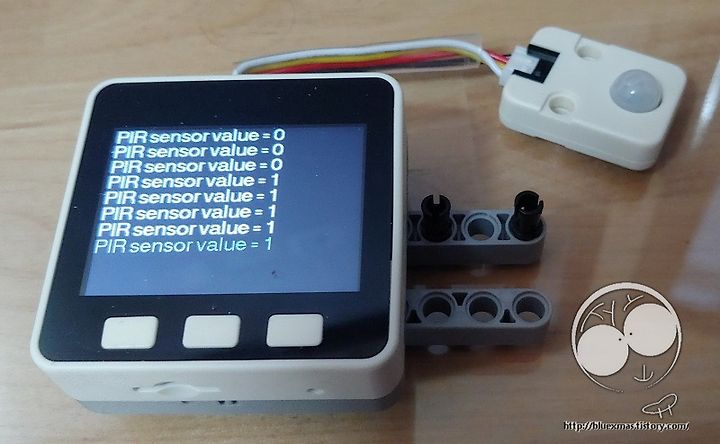
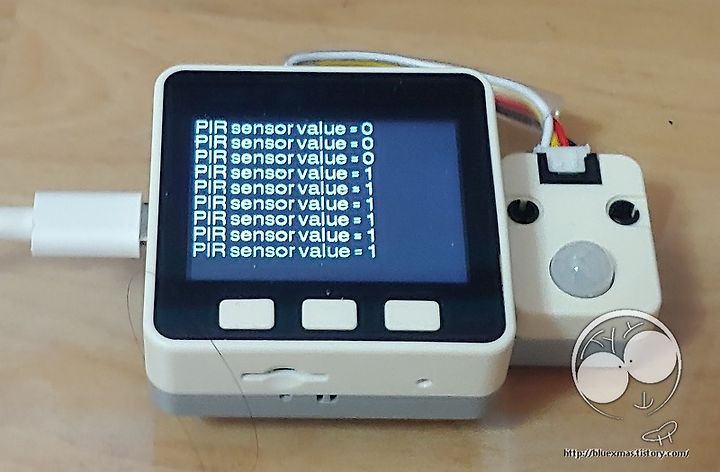
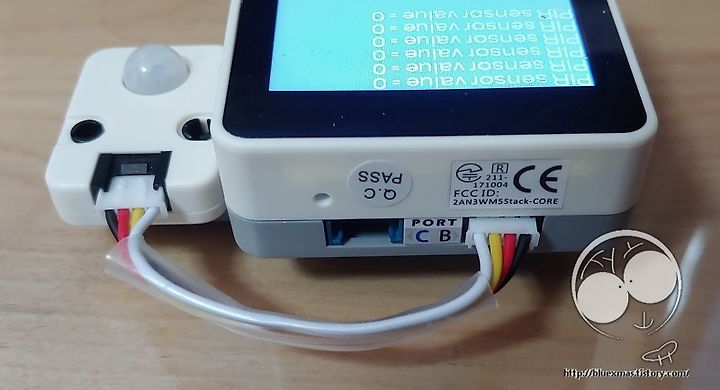
M5Go의 B Port와 적외선 센서을 Grove 케이블로 연결하고, M5Go의 B Port는 36번핀으로 디지탈 input 초기화( pinMode(36, INPUT); )를 setup 함수에서 하고, loop 함수에서 디지탈 값을 측정하는 함수( digitalRead(36); )를 사용 하시면 됩니다.
아두이노 핀 초기화
#define sensorPin 36
void setup() {
  pinMode(sensorPin, INPUT);
}
디지탈 값을 축정
void loop() {
  int cur_sensorValue = digitalRead(sensorPin);
}
아두이노 전체 소스
#include <M5Stack.h>

// The scrolling area must be a integral multiple of TEXT_HEIGHT
#define TEXT_HEIGHT 23 // Height of text to be printed and scrolled
#define BOT_FIXED_AREA 0 // Number of lines in bottom fixed area (lines counted from bottom of screen)
#define TOP_FIXED_AREA 0 // Number of lines in top fixed area (lines counted from top of screen)
#define YMAX 230 // Bottom of screen area

// The initial y coordinate of the top of the scrolling area
uint16_t yStart = TOP_FIXED_AREA;
// yArea must be a integral multiple of TEXT_HEIGHT
uint16_t yArea = YMAX-TOP_FIXED_AREA-BOT_FIXED_AREA;
// The initial y coordinate of the top of the bottom text line
uint16_t yDraw = YMAX - BOT_FIXED_AREA - TEXT_HEIGHT;

// Keep track of the drawing x coordinate
uint16_t xPos = 0;

// For the byte we read from the serial port
byte data = 0;

// A few test variables used during debugging
boolean change_colour = 1;
boolean selected = 1;

// We have to blank the top line each time the display is scrolled, but this takes up to 13 milliseconds
// for a full width line, meanwhile the serial buffer may be filling... and overflowing
// We can speed up scrolling of short text lines by just blanking the character we drew
int blank[19]; // We keep all the strings pixel lengths to optimise the speed of the top line blanking

// select the input pin for the potentiometer
#define sensorPin 36

// declaration
int cur_sensorValue = 0;

void setup() {
  M5.begin();
  M5.Lcd.fillScreen(TFT_BLACK);

  // Change colour for scrolling zone text
  M5.Lcd.setTextColor(TFT_WHITE, TFT_BLACK);

  // Setup scroll area
  setupScrollArea(TOP_FIXED_AREA, BOT_FIXED_AREA);

  //
  pinMode(sensorPin, INPUT);
}

void loop() {
  // put your main code here, to run repeatedly:
  cur_sensorValue = digitalRead(sensorPin);
  char str[256];
  sprintf(str, "PIR sensor value = %d\n", cur_sensorValue);
  Serial.println(str);
  drawCentreString(str);
  delay(100);
}

void drawCentreString(String message) {
    byte data[message.length()];
    message.getBytes(data, message.length());

    for (int i = 0; i < message.length(); i++ ) {
        byte data = message[i];

        // If it is a CR or we are near end of line then scroll one line
        if (data == '\r' || xPos>321) {
          // 새줄
          xPos = 0;
          yDraw = scroll_line(); // It can take 13ms to scroll and blank 16 pixel lines
        }
        if (data > 31 && data < 128) {
          xPos += M5.Lcd.drawChar(data,xPos,yDraw,4);
          blank[(18+(yStart-TOP_FIXED_AREA)/TEXT_HEIGHT)%19]=xPos; // Keep a record of line lengths
        }
        //change_colour = 1; // Line to indicate buffer is being emptied
    }

    // 새줄
    xPos = 0;
    yDraw = scroll_line(); // It can take 13ms to scroll and blank 16 pixel lines
}

// ##############################################################################################
// Call this function to scroll the display one text line
// ##############################################################################################
int scroll_line() {
  int yTemp = yStart; // Store the old yStart, this is where we draw the next line
  // Use the record of line lengths to optimise the rectangle size we need to erase the top line
  // M5.Lcd.fillRect(0,yStart,blank[(yStart-TOP_FIXED_AREA)/TEXT_HEIGHT],TEXT_HEIGHT, TFT_BLACK);

  // LCD 초기화
  if (yStart == 0)
    M5.Lcd.fillScreen(TFT_BLACK);

  // Change the top of the scroll area
  yStart+=TEXT_HEIGHT;
  // The value must wrap around as the screen memory is a circular buffer
  if (yStart >= YMAX - BOT_FIXED_AREA)
    yStart = TOP_FIXED_AREA + (yStart - YMAX + BOT_FIXED_AREA);

  // Now we can scroll the display
  scrollAddress(yStart);

  return  yTemp;
}

// ##############################################################################################
// Setup a portion of the screen for vertical scrolling
// ##############################################################################################
// We are using a hardware feature of the display, so we can only scroll in portrait orientation
void setupScrollArea(uint16_t tfa, uint16_t bfa) {
  M5.Lcd.writecommand(ILI9341_VSCRDEF); // Vertical scroll definition
  M5.Lcd.writedata(tfa >> 8);           // Top Fixed Area line count
  M5.Lcd.writedata(tfa);
  M5.Lcd.writedata((YMAX-tfa-bfa)>>8);  // Vertical Scrolling Area line count
  M5.Lcd.writedata(YMAX-tfa-bfa);
  M5.Lcd.writedata(bfa >> 8);           // Bottom Fixed Area line count
  M5.Lcd.writedata(bfa);
}

// ##############################################################################################
// Setup the vertical scrolling start address pointer
// ##############################################################################################
void scrollAddress(uint16_t vsp) {
  M5.Lcd.writecommand(ILI9341_VSCRSADD); // Vertical scrolling pointer
  M5.Lcd.writedata(vsp>>8);
  M5.Lcd.writedata(vsp);
}
실행결과
M5Stack 물품 구매는 <네이버 검색/쇼핑에서 M5StackKorea>를 검색하시거나, M5Stack 공식 파트너인 <위즈네트 쇼핑몰: Shop.wiznet.io> 으로 접속하세요.

728x90